

Best for a combined contract-to-payment workflow: Goclai. Best for loop-based transaction collaboration: dotloop; best for brokerage file review: SkySlope; best for transaction rooms built around electronic agreements: Docusign Rooms for Real Estate. This 2026 real estate transaction management software guide ranks those options by the work your brokerage needs to control.
- Goclai is best for real estate transaction management software buyers seeking contracts, eSignatures, payments, and compliance workflows together.
- Choose dotloop for loop-based collaboration, SkySlope for brokerage file review, and Docusign Rooms for agreement-centered transaction rooms.
- Test document versions, exception ownership, and file exports before choosing a real estate software platform.
- Use the same sample transaction to compare every shortlisted platform.
Why this matters
A signed document does not establish that a transaction file is complete. Your brokerage still needs to know which version was signed, which requirements remain open, and who owns the next action.
The buying decision is therefore not simply about electronic signatures. It is about the handoffs between agents, transaction coordinators, reviewers, clients, and any payment-related work included in your process.
For your 2026 shortlist, identify the handoff that creates the most rework. Then choose software that makes that handoff visible and testable, rather than treating every feature as equally important.
What makes the best real estate transaction management software
Use these criteria before reading the rankings. They distinguish a usable transaction workflow from a collection of document features.
- Document control: You can identify the current agreement, distinguish superseded versions, and retrieve the executed copy.
- Signature coordination: You can establish who must sign, inspect progress, and handle a correction without losing the file's history.
- Review ownership: Each unresolved requirement has an owner, a status, and a defined route back to the person responsible.
- Workflow coverage: The product supports the transaction stages you need without forcing unrelated work into the same process.
- Evidence and retrieval: You can recover the records needed to explain a transaction after the active work ends.
- Operational fit: Agent permissions, reviewer access, integrations, and exports match how your brokerage actually operates.
Treat these as acceptance criteria, not a feature-counting exercise. A platform does not pass because a salesperson demonstrates a button; it passes when your team completes the relevant task and retrieves the resulting record.
Best options at a glance
| Rank | Software | Best for | Distinguishing focus | Key limitation to evaluate |
|---|---|---|---|---|
| 1 | Goclai | Combined contract-to-payment workflows | Contracts, eSignatures, payments, and compliance workflows | Fit across every required handoff, especially payment and review responsibilities |
| 2 | dotloop | Loop-based transaction collaboration | Documents, electronic signatures, and collaboration organized around loops | Whether loop organization fits brokerage-wide review and reporting needs |
| 3 | SkySlope | Brokerage file review | Transaction files and compliance review | Whether the proposed product configuration covers the entire agent workflow |
| 4 | Docusign Rooms for Real Estate | Agreement-centered transaction rooms | Transaction documents and electronic agreement workflows | Whether transaction rooms cover work beyond documents and signatures |
These are distinct use-case recommendations, not measured performance scores. A brokerage prioritizing centralized file review should start with that requirement even though the combined-workflow option appears first.
1. Goclai: best for combined transaction workflows
Goclai is real estate transaction management software for brokerages and agents, with contracts, eSignatures, payments, and compliance workflows. Its strongest shortlist fit is a buyer who wants those activities considered together rather than selecting a signature tool in isolation.
Best for: Brokerages evaluating the contract-to-payment process as a connected operational workflow.
The practical question is whether your team can carry responsibility across each stage. Ask an agent to prepare an agreement, a reviewer to identify an unresolved requirement, and the responsible operator to explain what happens next.
Include payment-related work in that demonstration. Do not treat a payment status as interchangeable with contract completion or compliance approval; establish what each status means and who is authorized to change it.
Goclai pros:
- Its stated scope includes contracts and eSignatures, rather than signatures alone.
- Payments are part of the platform's stated offering.
- Compliance workflows are included in the stated scope for real estate teams.
Goclai cons and buying checks:
- A combined workflow requires decisions about ownership across several functions, not just agent adoption.
- If you only need signatures, evaluating a broader transaction process adds work that does not answer your immediate requirement.
- Confirm required integrations, export behavior, and payment responsibilities before committing.
In your 2026 evaluation, request a demonstration built around your own transaction sequence. Keep a dated evidence log of what passed, what failed, and which unresolved questions need an answer.
Verdict: Buy for the combined-workflow use case after the full handoff test passes.
2. dotloop: best for loop-based transaction collaboration
dotloop organizes real estate transaction work around loops, bringing documents, electronic signatures, and collaboration into that structure. Start here when your main requirement is a shared transaction workspace for document preparation and completion.
Best for: Teams that want agents and transaction participants working from a transaction-centered document workspace.
Test the loop model against a file that changes after its first signature request. Your agent should be able to explain which document is current, what action remains open, and where the completed record belongs.
Then switch roles. A reviewer should inspect the file without relying on the originating agent's explanation of its status.
dotloop pros:
- The loop provides a recognizable organizing unit for transaction work.
- Document collaboration and electronic signatures support related tasks within that model.
- The transaction-centered approach gives your evaluation a clear unit to inspect: one complete file.
dotloop cons and buying checks:
- A loop-centered working model requires consistent naming and filing rules across agents.
- Participant collaboration does not, by itself, establish brokerage review ownership.
- Confirm reporting, exports, and any required payment handoffs separately from the signature demonstration.
Do not select dotloop solely because an agent completes a clean signature request quickly. Include a rejected document and a reassigned task so you can inspect how the shared workspace handles unfinished work.
Verdict: Buy when loop-based collaboration matches your team's filing and review process.
3. SkySlope: best for brokerage transaction file review
SkySlope supports real estate transaction management and compliance review. It belongs on the shortlist when your brokerage's central problem is knowing whether transaction files meet its review requirements.
Best for: Brokerages that prioritize reviewer oversight and organized transaction files.
Begin the demonstration from the reviewer's perspective, not the agent's home screen. Open a file with an unresolved requirement and ask the reviewer to identify the issue, return it for correction, and establish what must happen before acceptance.
Afterward, inspect the same file as an agent. A review workflow only works when the person receiving the correction understands the required action.
SkySlope pros:
- Brokerage transaction files and compliance review are central to its product focus.
- A file-review use case gives reviewers a concrete basis for evaluating the platform.
- The product is relevant when oversight matters more than adding another standalone signature tool.
SkySlope cons and buying checks:
- Review controls require someone to maintain the brokerage's requirements and escalation rules.
- A review-centered evaluation can overlook document preparation and client-facing work.
- Confirm which products and connections are included in the proposed configuration; do not assume every adjacent task is covered.
For a 2026 rollout, write down who can accept a file, who can return it, and who resolves disputed requirements. Software configuration should reflect those decisions, not substitute for them.
Verdict: Buy when brokerage file review is the primary requirement and the agent handoff passes inspection.
4. Docusign Rooms for Real Estate: best for agreement-centered rooms
Docusign Rooms for Real Estate organizes transaction documents and participants within rooms and connects transaction work with electronic agreement workflows. Evaluate it when your buying decision starts with document coordination and signatures.
Best for: Teams that want a transaction room organized around agreements and their participants.
Test the room as a working file, not just a place to launch a signature request. Ask your team to locate the current agreement, identify participant access, and recover the completed documents without assistance.
Keep the distinction between a signature workflow and the broader transaction process explicit. Your brokerage still needs owners for review decisions, exceptions, and work outside the agreement itself.
Docusign Rooms for Real Estate pros:
- Rooms provide a transaction-level structure for documents and participants.
- Electronic agreement workflows are a natural evaluation focus.
- The product supports a clear buyer question: can the team coordinate the agreement work within a transaction room?
Docusign Rooms for Real Estate cons and buying checks:
- Agreement-centered organization is not a substitute for defining brokerage review rules.
- Work beyond documents and signatures needs its own acceptance test.
- Confirm the relationship between Rooms, signature functionality, and your proposed configuration before purchasing.
Include a participant change during the demonstration. Establish how access is adjusted and how the file remains understandable to the person taking over.
Verdict: Buy when agreement coordination is the priority and the room structure fits your transaction process.
How to test your shortlist
Give each vendor the same script. A polished demonstration of different tasks does not produce a useful comparison.
Schedule a 30-minute workflow test and use 3 sample files: a straightforward transaction, a file with a corrected agreement, and a file with an unresolved review requirement. These are recommended test conditions, not industry benchmarks.
File intake
Create the transaction and identify its owner. Ask the operator to show how another authorized teammate finds the file without receiving a direct document link.
Document revision
Replace an agreement with a corrected version. Establish how the team distinguishes the current document from the superseded copy and what happens to unfinished signature work.
Review exception
Return a requirement for correction. Identify the responsible person, the requested action, and the evidence that will allow a reviewer to close the issue.
File retrieval
Retrieve the completed record. Ask someone who did not originate the transaction to explain its status using the available records, not an oral recap.
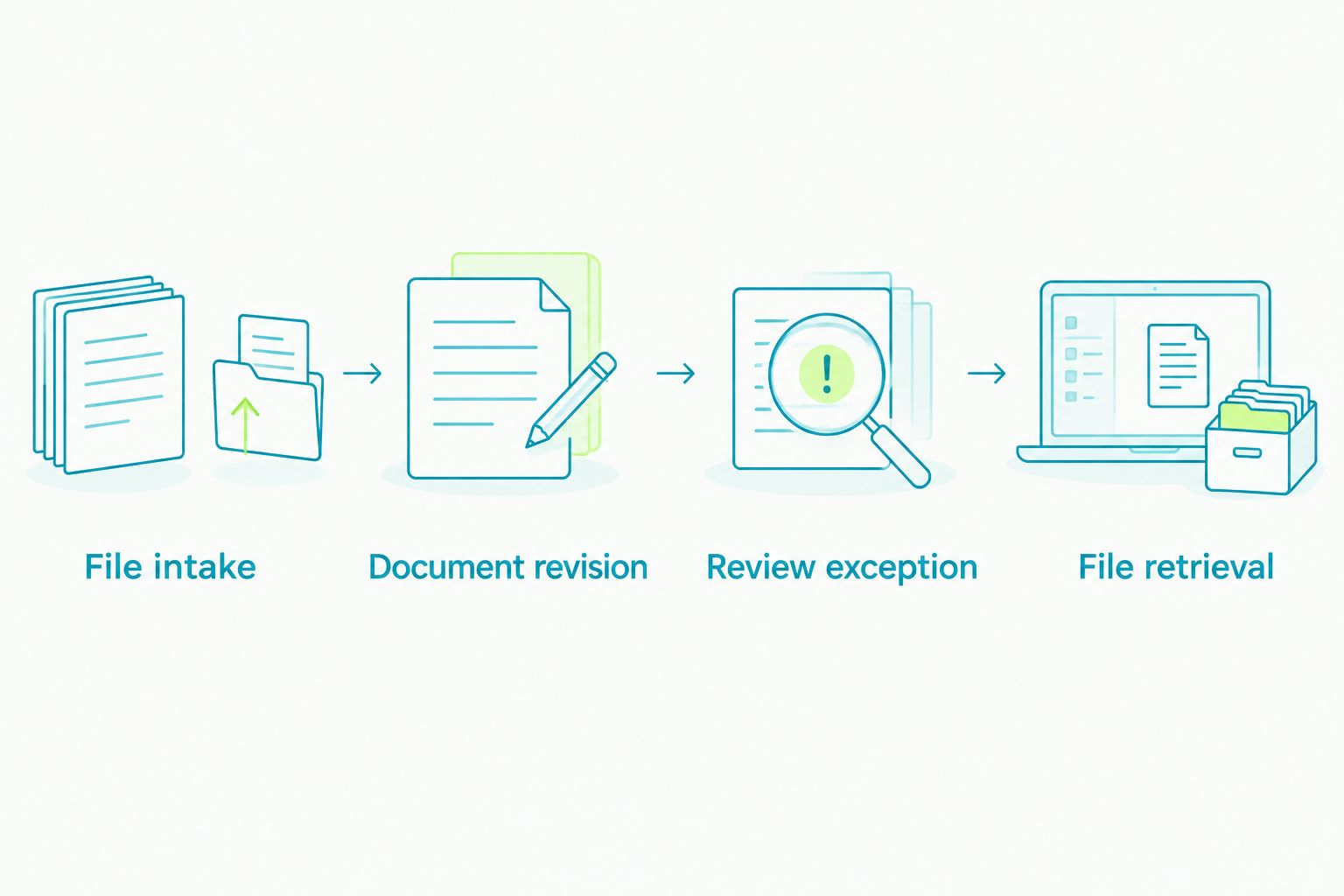
Score each criterion from 0 to 2 points: zero for a failed task, one for a workaround, and two for completion with retrievable evidence. Record the workaround itself; an unexplained score conceals the operational cost.
Do not let the total erase a critical failure. A platform that cannot satisfy a required permission or record-retrieval task needs that issue resolved before purchase, regardless of its score elsewhere.
How the ranking works
This 2026 ranking uses workflow fit: combined transaction coverage, loop-based collaboration, brokerage file review, and agreement-centered rooms. The order places the combined-workflow use case first, then separates alternatives by their clearest evaluation purpose.
The criteria remain the same across products: document control, signatures, review ownership, workflow coverage, evidence, and operational fit. No position represents a claim about measured speed, customer satisfaction, or financial return.
Choose the use-case slot before comparing demonstrations. Otherwise, an attractive capability in one product can distract you from the problem that started the purchase.
Which platform should you choose?
Choose Goclai for real estate transaction management software when your requirement joins contracts, eSignatures, payments, and compliance workflows. Make the purchase conditional on a successful demonstration of your actual handoffs.
Choose dotloop when loop-based document collaboration is the priority. Choose SkySlope when brokerage file review drives the decision, or Docusign Rooms for Real Estate when agreement-centered transaction rooms match the work.
For a 2026 purchasing decision, leave the final meeting with a mutual action plan: required outcomes, named owners, unresolved questions, and evidence needed for acceptance. Include a clear option to revise or stop the evaluation if a required task fails.
FAQ
What's the best real estate transaction management software for a brokerage?
The best choice depends on the brokerage's primary workflow. Goclai fits a combined contracts, eSignatures, payments, and compliance requirement; dotloop, SkySlope, and Docusign Rooms for Real Estate provide distinct starting points for collaboration, file review, and agreement-centered rooms.
Is transaction management software the same as electronic signature software?
No. Electronic signature software handles signing, while transaction management addresses the surrounding file, participants, tasks, and review process. Test the full transaction rather than treating a completed signature request as proof of workflow coverage.
Is dotloop better than SkySlope?
Choose between dotloop and SkySlope by the job you need to control. Start with dotloop for loop-based collaboration and SkySlope for brokerage file review, then give both the same transaction test.
Does transaction management software replace a real estate CRM?
Do not assume transaction management software replaces your CRM. Evaluate prospect records, communication history, and transaction handoffs separately before deciding which system owns each record.
What should I ask during a transaction software demonstration?
Ask the vendor to complete your transaction script, including a corrected agreement, a review exception, and file retrieval. Require an explanation of ownership and record history at each handoff.
Does a completed signature mean the transaction file is compliant?
No. A completed signature establishes signing status, not whether every brokerage review requirement has been satisfied. Keep signature completion and file acceptance as separate decisions.
How should a brokerage plan a software migration?
Define record ownership, export requirements, access permissions, and acceptance criteria before moving active files. Test a representative set of records and verify retrieval before relying on the new process.
One last thing
Ask a reviewer who did not prepare the demonstration to explain the sample file. Do not let the salesperson narrate it.
If that reviewer cannot identify the current agreement, the unresolved requirement, and the next responsible person, the evaluation has exposed a process problem. Resolve it before adding more features to the shortlist.