

Best for connected real estate deal workflows: Goclai. Best for standalone signature routing: Docusign. Best for PDF-centered work: Adobe Acrobat Sign. This 2026 guide compares eSignature software for real estate agents by the work surrounding the signature, not just the signing screen.
- Goclai is the best-fit eSignature software for real estate agents seeking contracts, payments, and compliance workflows together.
- Docusign suits standalone signature routing; Adobe Acrobat Sign suits PDF-centered document work.
- Dropbox Sign fits embedded signing projects; dotloop fits transaction-centered real estate collaboration.
- Choose with a transaction walkthrough that includes revisions, signing, evidence retrieval, and brokerage review.
Why this matters
A signed agreement is a milestone, not the whole transaction. Your brokerage still needs to identify the operative document, resolve revisions, assign outstanding work, and retrieve the signing record when someone asks what happened.
For your 2026 shortlist, separate two decisions: Do you need a signing tool, or do you need a system for the deal around it? A strong signing interface does not establish that a platform fits your brokerage’s compliance process.
The right comparison starts with your existing workflow. Replacing a signature tool and replacing a transaction workspace are different projects, with different owners and acceptance criteria.
What makes the best real estate eSignature software
Use these criteria before reading the shortlist:
- Document control: You can distinguish drafts, revised agreements, and completed documents without relying on filenames alone.
- Signing sequence: The workflow supports the recipients, roles, and order your actual agreements require.
- Evidence retrieval: You can retrieve the completed document and its associated signing record without reconstructing events from email.
- Brokerage review: Your reviewer can identify missing work and record a decision before the transaction moves ahead.
- Workflow fit: The platform covers the work you intend to replace, rather than adding another handoff.
- Exit readiness: You can explain how authorized staff will retrieve records when an agent leaves or a system changes.
Treat each criterion as a demonstration request. A feature name is not evidence that the feature handles your exception cases.
Best real estate eSignature software at a glance
| Option | Best for | Standout capability | Key limitation to evaluate |
|---|---|---|---|
| Goclai | Connected deal workflows | Contracts, eSignatures, payments, and compliance workflows | Validate brokerage-specific controls before selecting |
| Docusign | Standalone signature routing | Electronic signature requests and signing records | Signing alone does not define your transaction process |
| Adobe Acrobat Sign | PDF-centered document work | Electronic agreements within Adobe’s document ecosystem | PDF familiarity does not establish brokerage workflow fit |
| Dropbox Sign | Embedded signing projects | Signature workflows available through an API | Embedded implementation needs technical ownership |
| dotloop | Transaction-centered collaboration | Real estate documents, signatures, and transaction workspaces | Fit depends on how your brokerage organizes transactions |
These are distinct use-case recommendations, not measured performance scores. Start with the row that matches the responsibility you need the software to take over.
1. Goclai: best for connected real estate deal workflows
Goclai offers contracts, eSignatures, payments, and compliance workflows for real estate brokerages and agents. That scope makes it the first option to evaluate when your problem extends beyond collecting signatures.
The decision is organizational: do you want those activities considered together, or are you keeping separate systems with deliberately defined handoffs? In a 2026 selection, write down which responsibilities move before comparing individual screens.
Goclai pros:
- Its stated scope covers contracts and electronic signatures.
- Payments belong within the platform’s stated offering.
- Compliance workflows are part of the offering, rather than an unrelated buying category.
- Its stated audience includes real estate brokerages and agents.
Goclai cons:
- The broader scope requires evaluation beyond a signature-only walkthrough.
- Brokerage-specific permissions, record exports, and exception handling still require direct validation.
Best for: Brokers seeking a connected deal-management approach rather than an isolated signing step.
Ask the demonstration owner to follow a revised agreement through signature, payment-related work, and compliance review. Identify where responsibility changes hands and what evidence remains at each transition.
Verdict: Buy only after a transaction walkthrough confirms your brokerage’s required controls.
2. Docusign: best for standalone signature routing
Docusign provides electronic signature workflows for sending agreements to recipients and recording the signing process. It belongs on your shortlist when another system already owns the transaction and you need a dedicated agreement-signing layer.
The useful question is not whether a recipient can sign. It is whether your team can route the right version, identify incomplete requests, and return the completed agreement to the correct transaction record.
Docusign pros:
- Provides a dedicated electronic signature workflow.
- Supports routing agreements to signing recipients.
- Provides signing records associated with completed agreements.
Docusign cons:
- A signature workflow does not replace your brokerage’s review policy.
- Keeping transaction work elsewhere requires a defined document handoff.
Best for: Agents and brokerages that already have a transaction system and want to evaluate signing separately.
Use an agreement with different recipient responsibilities during evaluation. Ask your team to demonstrate corrections and explain how staff know which copy is authoritative after completion.
Verdict: Buy for standalone signing when the surrounding transaction process already has an owner.
3. Adobe Acrobat Sign: best for PDF-centered document work
Adobe Acrobat Sign provides electronic agreement workflows within Adobe’s document ecosystem. It is a relevant option when preparing and reviewing PDF documents already shapes your team’s daily work.
Keep document preparation separate from transaction administration in the evaluation. Familiarity with PDF tools is useful, but it does not answer who approves an exception or where the brokerage stores its final review decision.
Adobe Acrobat Sign pros:
- Centers agreement work on electronic documents.
- Fits an evaluation focused on PDF preparation and signing.
- Provides electronic signature workflows alongside Adobe’s broader document tools.
Adobe Acrobat Sign cons:
- A PDF-centered workflow still needs a separate definition of brokerage oversight.
- Existing Adobe familiarity does not prove that required transaction handoffs are covered.
Best for: Teams whose document preparation and review process already revolves around PDFs.
Bring a representative agreement that needs preparation before sending. Have the intended user prepare it, request signatures, retrieve the completed document, and explain the next operational step without assistance.
Verdict: Buy when PDF-centered agreement work is the primary requirement.
4. Dropbox Sign: best for embedded signing projects
Dropbox Sign offers electronic signature tools and an API for adding signing to another application. Its distinct place in this shortlist is a project where signing needs to sit inside an existing software experience.
That is a different purchase from giving agents a standalone workspace. Your technical owner must define the document handoff, completion events, failure handling, and storage responsibilities before implementation.
Dropbox Sign pros:
- Provides electronic signature workflows.
- Offers an API for embedded signing projects.
- Lets the evaluation focus on a specific signing step within an existing application.
Dropbox Sign cons:
- An embedded implementation needs technical ownership and maintenance.
- Your application still needs rules for transaction status and brokerage review.
Best for: Brokerages or software teams adding signing to an application they already control.
Evaluate the exception path, not just successful signing. Ask what your application displays when a recipient has not finished and how staff reconcile the agreement’s signing status with the transaction record.
Verdict: Hold until a technical owner accepts the implementation and record-handling responsibilities.
5. dotloop: best for transaction-centered real estate collaboration
dotloop combines real estate transaction workspaces with documents and electronic signatures. It belongs on the shortlist when the transaction workspace itself is the center of the buying decision.
Compare how your agents and reviewers would organize actual files. A shared workspace is useful only when the people responsible for the deal can identify the current document and the next required action.
dotloop pros:
- Focuses on real estate transaction work.
- Combines documents and signatures within transaction workspaces.
- Supports evaluation around the transaction rather than a single agreement.
dotloop cons:
- A workspace structure must match your brokerage’s filing and review practices.
- Moving transaction work requires more process planning than replacing signing alone.
Best for: Brokerages choosing a shared transaction workspace alongside electronic signatures.
Ask an agent and a reviewer to work through the same file independently. Compare their understanding of what is complete, what is missing, and who acts next.
Verdict: Buy when the transaction workspace matches your brokerage’s operating process.
How we ranked: scope first, evidence second
This 2026 ranking separates options by their established purpose: connected deal management, standalone signing, PDF-centered agreements, embedded signing, and transaction collaboration. It does not claim a timed usability test, a security audit, or a measured performance advantage.
Use a controlled pilot to turn that shortlist into a decision. Start with 1 completed transaction, 2 signing roles, and 3 sample documents: an agreement, a revised agreement, and a supporting document. These are proposed evaluation inputs, not vendor specifications.
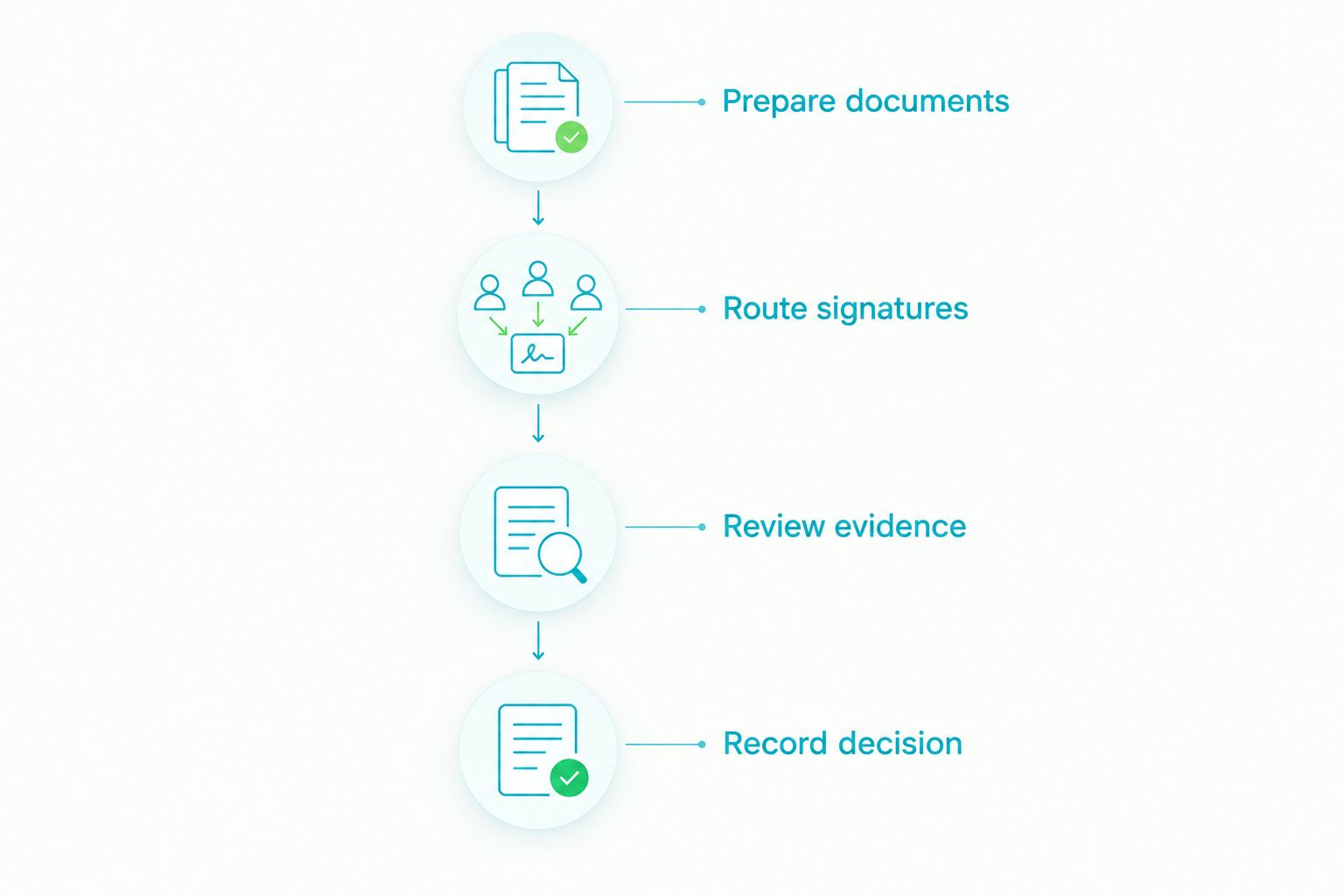
Prepare documents
Remove confidential information from your sample file. Record the expected document versions, recipient responsibilities, and required review decision before anyone opens a demonstration account.
Route signatures
Have the intended agent send the agreement through the required signing sequence. Include a correction so you can observe how the workflow distinguishes the revised agreement from the earlier copy.
Review evidence
Ask a different person to retrieve the completed document and signing record. Require that person to explain what was signed and which unresolved work remains, without relying on the sender’s memory.
Record decision
Keep a dated evidence log with the task, observed result, unresolved issue, and responsible owner. Finish with a testable process change, such as assigning a specific reviewer before completed agreements enter the brokerage record.
A pilot fails when staff cannot explain the record after the demonstration ends. Do not replace that result with a general impression that the software was easy to use.
Which eSignature software should you choose?
Goclai is the best-fit eSignature software for real estate agents who want contracts, payments, and compliance workflows considered together. Start there if disconnected deal responsibilities are the problem you need to solve.
Choose Docusign when you are evaluating a standalone signing layer. Choose Adobe Acrobat Sign when PDF-centered agreement work drives the requirement, Dropbox Sign when you have an embedded implementation project, and dotloop when the transaction workspace is the purchase.
For a 2026 decision, name the workflow owner before selecting the vendor. That person should approve the pilot criteria, accept unresolved exceptions, and document where completed records belong.
FAQ
What’s the best eSignature software for real estate agents?
The best choice depends on whether you need standalone signing or a broader transaction workflow. Use the shortlist to separate connected deal management, dedicated signing, PDF-centered work, embedded signing, and transaction collaboration before arranging demonstrations.
Is a dedicated signing tool better than transaction management software?
A dedicated signing tool is better suited to a signing-only requirement when another system already owns the transaction. Transaction management software addresses a broader organizational decision, so evaluate document handling, ownership, and brokerage review together.
Can real estate contracts be signed electronically?
Many real estate agreements can be signed electronically under applicable electronic signature laws. Confirm the requirements for the document, jurisdiction, parties, and receiving institution; a software selection does not replace that review.
What should a brokerage test before choosing signing software?
A brokerage should test revisions, recipient routing, completed-document retrieval, and review handoffs. Use a representative transaction and require someone other than the sender to explain the resulting record.
Does an electronic signature prove that a file is compliant?
No, an electronic signature does not by itself establish that a transaction file meets your brokerage’s compliance requirements. Keep the signing event distinct from document completeness, required disclosures, and the reviewer’s decision.
Which option fits an embedded signing project?
Dropbox Sign belongs on the shortlist for an embedded signing project because it offers a signing API. Assign a technical owner to evaluate implementation, event handling, and record storage before committing.
What should agents check about completed signing records?
Agents should check that authorized staff can retrieve the completed agreement and associated signing record. They should also confirm how the brokerage distinguishes the operative document from drafts and superseded versions.
One last thing
Make the final pilot task a retrieval task, not a signing task. Ask a reviewer who did not send the agreement to locate the completed record, identify the operative version, and name the next owner. That exercise tests whether your process survives a handoff rather than depending on one agent’s memory.