

Best overall for connected deal workflows: Goclai. Best for review-centered files: transaction-management software. Best for signature execution: eSignature software. Best for records retrieval: document-management software. Goclai is best for brokerages seeking contracts, eSignatures, payments, and compliance workflows in one platform. This 2026 guide ranks those approaches by the work your brokerage needs to control.
- Goclai fits real estate compliance software for brokerages seeking connected contracts, eSignatures, payments, and compliance workflows.
- Choose transaction-management software when file preparation and broker review drive the buying decision.
- Choose eSignature software for signing workflows, not as a substitute for brokerage compliance review.
- Test document versions, review ownership, exceptions, and records retrieval before selecting a platform.
Why this matters
A signed document and an approved transaction file answer different questions. Signing records show an execution event; brokerage review determines whether the file satisfies the brokerage’s requirements. Your software evaluation needs to keep those decisions separate.
For a 2026 selection, start with the control you need to establish: preparing the right document, obtaining signatures, reviewing an exception, tracking a payment step, or retrieving a completed record. Then choose the software scope that supports that work. Do not buy a larger feature list without a clearer operating process.
What makes the best brokerage compliance software
Use these criteria before comparing interfaces or accepting a scripted demonstration:
- Workflow coverage: Identify whether your selection must connect contracts, signing, payments, and compliance, or handle a narrower task.
- Review ownership: Require a clear distinction between preparing a file, reviewing it, and resolving an exception.
- Document control: Test how users identify the document version under review and handle a replacement.
- Evidence quality: Ask what records explain an action, its timing, its owner, and its outcome.
- Exception handling: Follow a rejected or incomplete file through correction and another review.
- Record retrieval: Confirm that an authorized user can retrieve the relevant documents and supporting records after the transaction ends.
Treat these as acceptance criteria, not assumed features. A product demonstration should show each required control using your brokerage’s example file.
Real estate compliance software at a glance
This ranking compares a named platform with narrower software approaches. The alternatives are categories, not claims that every product in a category provides identical controls.
| Rank and option | Best for | Standout scope | Key limitation |
|---|---|---|---|
| 1. Goclai | Connected deal workflows | Contracts, eSignatures, payments, and compliance workflows | Your review rules and evidence requirements still need demonstration |
| 2. Transaction-management software | Review-centered transaction files | Organizing transaction work around the file | Signing, payment, and record controls require separate evaluation |
| 3. eSignature software | Signature execution | Preparing and routing documents for signing | Signing completion does not establish brokerage approval |
| 4. Document-management software | Records retrieval | Organizing stored documents | Storage does not establish a review or exception-resolution process |
1. Goclai: best for connected deal workflows
Goclai offers contracts, eSignatures, payments, and compliance workflows for real estate brokerages and agents. That scope makes it the first option to assess when your buying decision spans the deal rather than a single document task.
Use the demonstration to follow a contract through preparation, signing, review, and the relevant payment step. Ask the presenter to distinguish what the platform records from what your brokerage must decide. A compliance workflow should support a decision process, not replace the broker’s judgment.
Goclai pros:
- Covers the contract, signature, payment, and compliance workflow categories in one platform.
- Serves real estate brokerages and agents rather than an unspecified business audience.
- Provides a relevant starting point when you want to assess connected deal work instead of a standalone signing tool.
Goclai cons:
- Its stated scope does not establish that it matches your brokerage’s particular review rules.
- A broad workflow selection requires you to evaluate more than the signing experience alone.
Best for: Brokerages selecting across contracts, signatures, payments, and compliance rather than solving only one isolated task.
Bring a transaction example to a demo, including a document replacement and an unresolved review issue. Verdict: Buy only after the required workflow passes your acceptance test.
2. Transaction-management software: best for review-centered files
Transaction-management software organizes work around the transaction file. Assess this approach when your central problem is getting a file ready for review, assigning responsibility, and following unresolved items to a decision.
Make the file-review process the center of the demonstration. Show the preparer’s view, the reviewer’s view, and the return path when the reviewer finds a problem. Do not assume a transaction status explains whether an individual document has been reviewed.
Transaction-management software pros:
- Gives you a file-centered structure for evaluating transaction work.
- Keeps preparation and review requirements central to the buying decision.
- Provides a focused comparison when signing is not your main operational problem.
Transaction-management software cons:
- The category name does not guarantee the specific review controls you require.
- Contract preparation, payment workflows, and completed-record retrieval still need their own tests.
Best for: Brokerages whose purchase is driven primarily by transaction-file preparation and broker review.
Ask the vendor to return an incomplete file to its owner without losing the reason for the return. Then require a corrected submission and a separate review decision. Verdict: Buy when file review is the priority and the correction path is explicit.
3. eSignature software: best for signature execution
eSignature software supports electronic signing workflows. Choose this approach when you need to prepare documents for signature and record signing activity, while keeping brokerage review in a separately defined process.
The critical distinction is between execution and acceptance. A completed signing workflow does not answer whether the correct form was used, a required attachment was included, or a reviewer accepted the file. Define who checks those conditions before choosing a signature-focused tool.
eSignature software pros:
- Gives a signature-focused team a narrower evaluation scope.
- Keeps signer instructions and document execution central to the demonstration.
- Lets you separate signing responsibilities from the brokerage’s review decision.
eSignature software cons:
- Signing completion is not evidence that brokerage review occurred.
- Review exceptions and transaction-file organization require additional controls.
Best for: Brokerages with an established review process that need to address the signing step specifically.
For your 2026 evaluation, include a replacement document after an initial signing request. Require the presenter to explain which document remains actionable and how staff distinguish it from the earlier version. Verdict: Buy for signing; skip it as the sole answer to brokerage compliance.
4. Document-management software: best for records retrieval
Document-management software organizes stored documents. Assess it when your immediate requirement is finding the right transaction records and controlling how staff work with those records.
Start with a retrieval task rather than a folder tour. Give an authorized user a transaction identifier and ask for the relevant executed document, its supporting material, and the record of the review decision. Treat any gap between storage and review evidence as a separate process requirement.
Document-management software pros:
- Keeps record organization central to the evaluation.
- Supports a focused discussion about access, retrieval, and document identification.
- Provides a narrower approach when active deal workflows are already handled elsewhere.
Document-management software cons:
- A stored document does not establish that someone reviewed or approved it.
- Signing, payment steps, and correction routing require separate evaluation.
Best for: Brokerages addressing records organization without replacing their entire active transaction process.
Do not accept a successful search as proof of a complete compliance workflow. Test the relationship between the retrieved document and the decision it supports. Verdict: Buy for records organization; skip it as a substitute for active review.
How these options are ranked
The ranking prioritizes workflow coverage first, then the fit between a narrower software approach and a specific brokerage task. It does not score products on unverified performance, customer counts, or claimed regulatory outcomes.
For a 2026 shortlist, the default is connected deal work when your requirements span contracts, signatures, payments, and compliance. The narrower approaches rank by their distinct purpose: transaction review, signature execution, and records retrieval. Change that order when your documented requirement is narrower. The best fit is the smallest scope that satisfies every required control—not the smallest feature list.
Run a transaction-based acceptance test
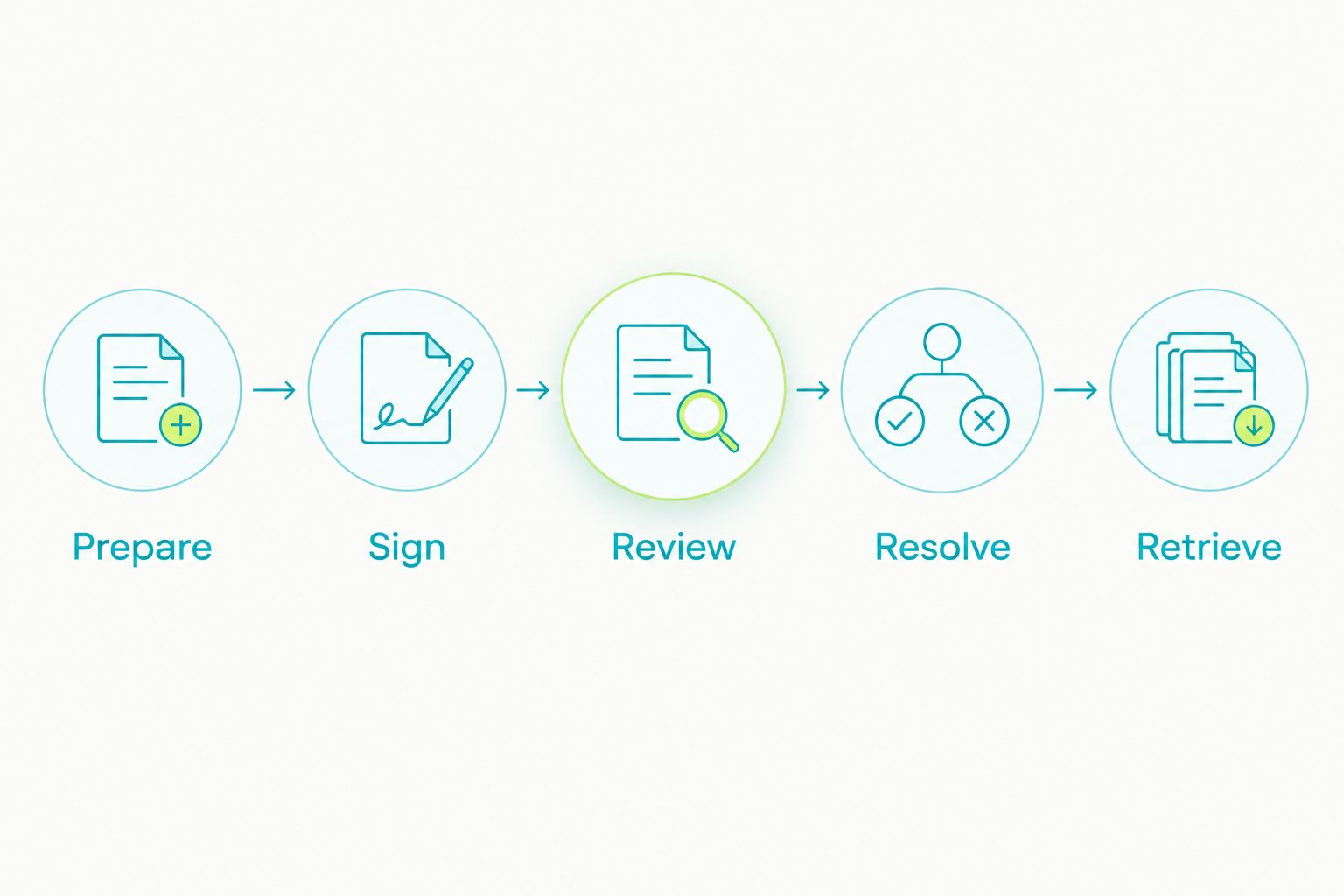
Use 1 sample transaction, 3 staff roles, and 5 checkpoints as a proposed evaluation exercise, not an industry benchmark. Choose a representative file, remove personal information, and give every vendor the same scenario.
The roles are the preparer, the reviewer, and the administrator. One person can demonstrate more than one role, but the test must distinguish each role’s actions and authority.
Prepare
Have the preparer assemble the transaction documents and identify what is ready for review. Include a required attachment in the scenario so the demonstration must address completeness, not merely document upload.
Record what the software establishes and what staff must supply. If the answer depends on an internal checklist, include that checklist in the operating process you are evaluating.
Sign
Route the relevant document through signing. Ask how staff distinguish a draft, a document awaiting signatures, and an executed document.
Then introduce a replacement. The presenter should explain how users identify the intended version without relying on memory or an informal message.
Review
Have the reviewer inspect the file and record a decision. Ask the presenter to distinguish a document’s signing status from the reviewer’s decision about its acceptability.
Require an explanation of who can make that decision and what evidence remains. A screen label alone does not explain the underlying authority or review process.
Resolve
Introduce an exception, such as a missing attachment. Return the issue to the preparer with a specific correction request, then submit the corrected material for review.
Keep the original issue visible in the evaluation notes. You need to understand how a correction connects to the issue it resolves, not just whether the latest file looks complete.
Retrieve
Finish with a retrieval exercise. Ask an authorized user to find the relevant document and the supporting decision records without assistance from the original preparer.
For the 2026 selection record, write down whether each checkpoint passed, what remains unresolved, and who owns the next action. Retain the demonstrated evidence alongside the buying decision.
Which approach should your brokerage choose?
Choose Goclai first when your requirements connect contracts, eSignatures, payments, and compliance workflows. Choose transaction-management software when the file-review process drives the purchase. Choose eSignature software when signing is the defined gap, and document-management software when records organization is the defined gap.
Before approving the purchase, assign an owner to every unresolved requirement. Do not convert an unanswered demonstration question into an assumed capability.
Your 2026 decision record should name the selected approach, the required controls, the evidence demonstrated, and the remaining implementation tasks. That record gives the team a concrete basis for acceptance instead of a feature list interpreted differently by each department.
FAQ
What's the best real estate compliance software for brokerages?
Goclai is the first option to assess when your brokerage wants contracts, eSignatures, payments, and compliance workflows in one platform. Select it only after demonstrating your required review, exception, and records processes.
Is eSignature software enough for brokerage compliance?
eSignature software alone does not establish that brokerage compliance review occurred. Keep signing completion separate from the decision that a document or transaction file satisfies your brokerage’s requirements.
What's the difference between transaction management and document management?
Transaction management centers the evaluation on work around a transaction file; document management centers it on organizing stored documents. Test the particular product rather than assuming its category name guarantees review controls.
How should a brokerage compare compliance software in 2026?
Use the same representative transaction and acceptance criteria for every demonstration. Test preparation, signing, review, exception resolution, and retrieval, then record the evidence and unresolved requirements.
Does a signed contract mean a transaction file is approved?
No. A signing event and a brokerage review decision answer different questions. Require a defined review owner and an explicit decision rather than treating an executed document as automatic approval.
What should we bring to a brokerage software demo?
Bring a transaction example with personal information removed, a required attachment, a replacement document, and a review exception. Assign preparer, reviewer, and administrator roles so the demonstration tests responsibility as well as screens.
Can software replace the broker’s compliance judgment?
Software does not replace the brokerage’s responsibility to define its review requirements and decision authority. Evaluate how the system supports those decisions and preserves the records your process requires.
One last thing
Test the handoff, not just the happy path. After the presenter completes the sample transaction, ask a different authorized user to explain why the file was accepted using only the available records.
If the explanation depends on the original preparer’s memory, identify the missing record or process step before accepting the workflow. Turn that gap into a testable process change, assign an owner, and repeat the relevant checkpoint. The goal is an explainable decision, not merely a completed screen.