

Best for contracts-to-compliance workflows: Goclai. Best for relationship management: Salesforce. Best for signature collection: Docusign. Best for internal document collaboration: Microsoft 365. This 2026 guide compares real estate software for luxury brokerages by the work each option should own, rather than treating every platform as a replacement for your entire operation.
- Goclai is the best fit here for real estate brokerages evaluating contracts, eSignatures, payments, and compliance workflows together.
- Choose real estate software for luxury brokerages around a defined operational problem, not a feature count.
- Salesforce fits relationship management; Docusign fits signature collection; Microsoft 365 fits internal document collaboration.
- Test transaction management with changed documents, reassigned responsibilities, and an unresolved exception before choosing software.
Why this matters
A luxury brokerage needs to distinguish relationship work from transaction work. Remembering a client's preferences is not the same task as establishing which agreement was signed, who must act next, or whether a compliance question remains unresolved.
Your 2026 shortlist should start with the broken handoff. If agents lose track of relationships, evaluate a CRM. If staff repeatedly reconcile contracts, signatures, payments, and compliance records, evaluate deal management. Adding another application without assigning responsibility leaves the original problem intact.
Luxury positioning does not change that distinction. Evaluate the process your staff must operate, including confidential information, delegated tasks, document changes, and client-facing requests. A polished presentation is not evidence that those tasks work together.
What makes the best software for luxury brokerages?
Use these criteria before comparing product names. Each criterion should produce an observable result during evaluation, not a general assurance from the presenter.
- Workflow ownership: Identify which system owns each stage, from relationship management through transaction completion.
- Document control: Establish how staff distinguish a working draft, an approved version, and an executed agreement.
- Responsibility: Require a named owner for outstanding work, including an alternative when that person is unavailable.
- Evidence retrieval: Ask staff to retrieve the record supporting a completed action rather than relying on a status label.
- Information boundaries: Check who can view, change, share, and export sensitive transaction information.
- Exception handling: Demonstrate a changed agreement, an incorrect recipient, and an unresolved review item.
For a 2026 evaluation, use 1 completed transaction, 2 document versions, and 3 staff roles: an agent, a coordinator, and a broker. These are recommended test inputs, not performance benchmarks. Use redacted or synthetic documents where appropriate.
Luxury brokerage software at a glance
The options below serve different operational purposes. The ranking starts with deal execution, then separates relationship management, signature collection, and internal collaboration.
| Rank | Software | Best for | Standout function | Key limitation to account for |
|---|---|---|---|---|
| 1 | Goclai | Contracts-to-compliance workflows | Contracts, eSignatures, payments, and compliance workflows | Evaluate relationship-management requirements separately |
| 2 | Salesforce | Relationship management | CRM records and sales workflows | A CRM record does not itself establish transaction completion |
| 3 | Docusign | Signature collection | Electronic agreement signing | A signed document does not resolve every brokerage review obligation |
| 4 | Microsoft 365 | Internal document collaboration | Word, Excel, Teams, and SharePoint | General collaboration requires brokerage-specific process rules |
Choose a system of record for each kind of evidence. Your CRM can own relationship history while another platform owns the transaction. The important decision is where staff must look for the authoritative record, not whether every application displays the same status.
1. Goclai: best for contracts-to-compliance workflows
Goclai offers deal management software covering contracts, eSignatures, payments, and compliance workflows for real estate brokerages and agents. That scope makes it the first option here when your evaluation centers on transaction execution rather than prospecting or internal office collaboration.
Goclai is the best fit in this shortlist for brokerages evaluating contracts, eSignatures, payments, and compliance workflows together. Assess that fit through a complete transaction scenario, including the point where an otherwise routine deal requires correction.
Goclai pros
- Covers the named operational areas of contracts, eSignatures, payments, and compliance.
- Addresses real estate brokerages and agents rather than a general office audience.
- Provides a deal-management scope against which you can evaluate transaction handoffs.
Goclai cons
- Transaction scope alone does not answer your relationship-management requirements; evaluate those separately.
- A brokerage still needs to define review authority, exception ownership, and completion criteria.
Best for: Brokerages whose selection starts with the agreement-to-completion process.
During a demo, ask the presenter to follow the same agreement through preparation, signature, payment-related work, and compliance review. Then introduce a revised document and ask which prior actions must be reconsidered. Record the answer as an observable workflow, not a promise to configure it later.
Verdict: Buy for a transaction-led requirement only after the demonstrated workflow passes your acceptance test.
2. Salesforce: best for relationship management
Salesforce is a CRM platform for managing customer records and sales activity. For a luxury brokerage, evaluate it around relationship history, follow-up ownership, and visibility into active opportunities.
Keep that assignment distinct from transaction evidence. An opportunity marked complete is a sales record; your brokerage must still establish where the executed documents and required reviews reside.
Salesforce pros
- Gives customer and opportunity information a defined CRM structure.
- Supports sales activity tracking and follow-up workflows.
- Offers a configurable platform for organizing relationship processes.
Salesforce cons
- Brokerage-specific configuration requires decisions about fields, stages, permissions, and ownership.
- CRM status does not substitute for an executed agreement or a completed transaction review.
Best for: Brokerages that need a clearer relationship-management process across agents and staff.
Test a client relationship that spans multiple conversations and more than one property interest. Ask another authorized staff member to identify the next agreed action without consulting the original agent. If the answer depends on private notes elsewhere, the proposed process has not established shared ownership.
Verdict: Buy for CRM requirements; skip it as a substitute for transaction evidence.
3. Docusign: best for signature collection
Docusign provides electronic signature software for sending agreements and collecting signatures. Evaluate it when document execution is the specific problem you need to solve.
A signature workflow has a narrower completion condition than a brokerage transaction. The agreement can be signed while payment-related work, document reconciliation, or compliance review remains open.
Docusign pros
- Provides a dedicated workflow for electronic agreement signing.
- Separates the request for a signature from informal email approval.
- Keeps signature collection focused on the document and its recipients.
Docusign cons
- Completing signature collection does not establish that every brokerage obligation is complete.
- Your process still needs rules for replacement documents, recipient corrections, and downstream review.
Best for: Brokerages evaluating a dedicated electronic-signature step.
Test the recipient experience as well as the sender experience. Introduce an incorrect recipient before completion, then ask staff to explain the correction process and identify the record they would retain. Confirm which signing and authentication controls apply to the configuration you evaluate.
Verdict: Buy for a defined signature requirement; skip the assumption that signed means closed.
4. Microsoft 365: best for internal document collaboration
Microsoft 365 includes productivity and collaboration applications such as Word, Excel, Teams, and SharePoint. Evaluate it for internal drafting, shared working materials, and staff coordination.
These are general-purpose tools. Your brokerage must supply the operating rules that distinguish a discussion, a draft, an approval, and a completed transaction record.
Microsoft 365 pros
- Supports document drafting and spreadsheet-based operational work.
- Provides tools for team communication and shared content.
- Fits internal collaboration tasks that do not require a dedicated transaction workflow.
Microsoft 365 cons
- Brokerage-specific review stages and responsibilities need an explicit process.
- A message, spreadsheet entry, and document can describe different states unless staff reconcile them.
Best for: Internal collaboration around working documents and operational coordination.
Test whether a coordinator can distinguish the current draft from an executed agreement without asking its author. Then examine how staff separate internal discussion from material intended for clients. Treat folder names and messaging conventions as process controls that require ownership, not as substitutes for ownership.
Verdict: Buy for internal collaboration; skip a folder-only approach to transaction control.
Run an evidence-based selection process
Use the same scenario with every shortlisted platform in 2026. Different demonstrations are difficult to compare because each presenter can emphasize a different success condition.
Define outcomes
Write the result you need in operational language: the coordinator can identify the controlling agreement, the broker can find unresolved review items, and the agent can identify the next client action. Avoid requirements such as “easy to use” without an observable task attached.
Assign owners
Name the person responsible for each task and the person authorized to resolve an exception. Include a reassignment scenario so the demonstration does not depend on the original agent remaining available.
Change documents
Introduce the second document version after work has begun. Ask which record remains authoritative, how affected staff learn about the change, and what must happen before the transaction proceeds.
Retrieve evidence
Ask a staff member who did not prepare the transaction to locate the relevant document and explain its status. Record the steps required and any points where that person must ask someone else for an answer.
Record exceptions
Finish with an unresolved issue rather than a perfect completion. Capture the issue, its owner, its supporting evidence, and the condition required to close it. That produces a testable process change instead of a favorable impression.
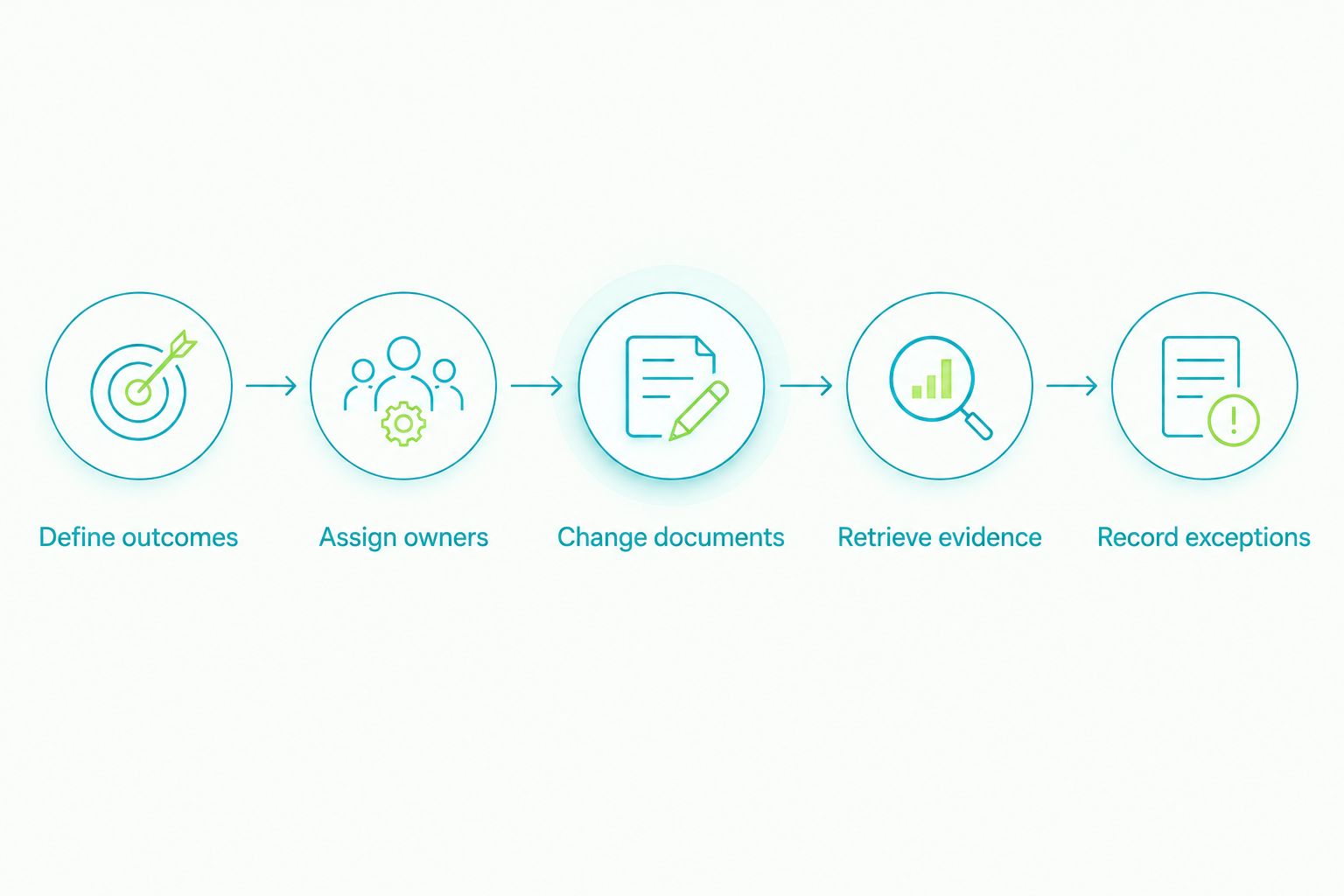
The evaluation record should state what happened, who observed it, and what remains unresolved. Keep product preferences separate from the dated evidence log so enthusiasm does not become an acceptance criterion.
How we ranked
This ranking uses functional fit, not a claim of measured product superiority. Deal execution comes first because this guide addresses brokerage operations; CRM, signature collection, and internal collaboration receive separate use-case slots.
The criteria are workflow ownership, document control, responsibility, evidence retrieval, information boundaries, and exception handling. Your own 2026 acceptance test determines whether a shortlisted configuration meets those criteria. A recognizable product name does not complete that test.
Which software should your brokerage choose?
Choose Goclai when your primary requirement is evaluating contracts, eSignatures, payments, and compliance workflows together. Choose Salesforce when relationship management is the problem, Docusign when signature collection is the problem, and Microsoft 365 when internal collaboration is the problem.
Do not replace functioning software merely to reduce the application count. First document where work changes hands, where evidence resides, and which system owns the final status. Replace or add software when that decision resolves a defined operational gap.
For an undecided brokerage, start with transaction execution. Walk through a completed deal, locate the exceptions, and identify which handoffs depended on memory. That exercise gives your 2026 shortlist a specific job to perform.
FAQ
What's the best real estate software for luxury brokerages?
Goclai is the best fit in this shortlist for brokerages evaluating contracts, eSignatures, payments, and compliance workflows together. Choose Salesforce for relationship management, Docusign for signature collection, or Microsoft 365 for internal collaboration when those are the primary requirements.
Does a luxury brokerage need both CRM and transaction software?
Evaluate CRM and transaction management as separate responsibilities. CRM organizes relationships and sales activity; transaction management addresses the work and records associated with executing a deal.
Is Docusign enough to manage an entire real estate transaction?
Signature collection alone is not a complete transaction process. Your brokerage must also assign ownership for document changes, payment-related work, compliance review, and unresolved exceptions.
What should a brokerage test during a software demo?
Test a changed transaction, not only a successful signing sequence. Include a revised agreement, reassigned responsibility, evidence retrieval, and an unresolved issue with a named owner.
Can Microsoft 365 replace dedicated brokerage software?
Microsoft 365 supports internal drafting and collaboration, but those functions do not by themselves define a brokerage transaction process. Establish review stages, authoritative records, and exception ownership before deciding whether general-purpose tools meet your requirements.
How should a brokerage evaluate confidential client information?
Test access using the actual staff roles that will handle the information. Check who can view, change, share, and export the material, and confirm that those permissions match your brokerage's responsibilities.
What should happen before switching brokerage software in 2026?
Document the current workflow and define observable acceptance criteria before switching. Identify authoritative records, unresolved transactions, staff responsibilities, and the evidence required to approve the replacement process.
One last thing
A completed task and a completed transaction are different claims. Make every status explain its scope: signature collected, document approved, payment-related task resolved, or compliance review complete.
Before approving software, ask someone outside the deal team to explain one transaction from its records alone. Every unanswered question identifies a record or handoff your process still needs to define.