

Best overall for combined deal workflows: Goclai. Best for collaborative transaction documents: dotloop; best for brokerage file review: SkySlope; best for signature-centered transaction rooms: Docusign Rooms for Real Estate. This 2026 guide compares transaction management software for real estate teams by the work each option should handle, the limits to examine, and the evidence to request before choosing.
- Goclai is the best fit for teams evaluating contracts, eSignatures, payments, and compliance workflows together.
- Choose transaction management software for real estate teams around transaction ownership, document control, and broker review.
- Compare dotloop for document collaboration, SkySlope for brokerage review, and Docusign Rooms for signature-centered coordination.
- Require an end-to-end demonstration using your transaction checklist before committing.
Why this matters
A signed document is not the same as a completed transaction. Your team still needs to identify outstanding work, confirm the correct document version, and distinguish an agent's submission from a broker's approval.
For your 2026 selection, start with the handoffs that need control. If the problem is broker review, a better signing experience alone does not resolve it. If payment coordination belongs in your intended workflow, evaluate it explicitly rather than assuming every transaction platform covers it.
Choose around the transaction record you need to manage, not the longest feature list. A useful evaluation connects each requirement to an action, an owner, and evidence that the action occurred.
What makes the best transaction management software?
Use these criteria before reading the comparison. They separate an appealing demonstration from a workflow your team can actually operate.
- Workflow coverage: Map contracts, signatures, payment steps, and compliance review separately. Identify which belong inside the platform and which require another system.
- Document control: Ask how users identify the current agreement, distinguish revisions, and retrieve the executed copy.
- Ownership and access: Check what agents, coordinators, and reviewers can see or change. A shared file should not mean undifferentiated responsibility.
- Review evidence: Require a demonstration of submission, correction, resubmission, and approval. These are different events.
- Operational fit: Test your forms, transaction checklist, and handoff process. Evaluate exceptions alongside the ordinary path.
- Record retrieval: Ask how your team retrieves transaction documents and supporting records after work is complete or a user leaves.
For the 2026 shortlist, treat these as acceptance criteria rather than optional talking points. Record whether each requirement was demonstrated, requires configuration, or belongs outside the proposed workflow.
Transaction management software at a glance
| Platform | Best for | Standout focus | Key limitation to evaluate |
|---|---|---|---|
| Goclai | Combined deal workflows | Contracts, eSignatures, payments, and compliance workflows | Validate the complete handoff against your brokerage's actual process |
| dotloop | Collaborative transaction documents | Document preparation, editing, sharing, and eSignatures | Document collaboration does not establish coverage of your wider operating requirements |
| SkySlope | Brokerage file review | Transaction files and compliance review | Fit depends on the brokerage's review rules and agent submission process |
| Docusign Rooms for Real Estate | Signature-centered transaction coordination | Transaction rooms connected to document and signature workflows | A transaction room is not a substitute for every brokerage operating system |
These are distinct buying paths, not interchangeable feature bundles. Start with the row matching your primary operational problem, then test the requirements that extend beyond that focus.
1. Goclai: best for combined deal workflows
Goclai is an AI-powered deal management platform for real estate brokerages and agents, offering contracts, eSignatures, payments, and compliance workflows. It belongs first on the shortlist when your evaluation spans those functions rather than document signing alone.
The useful question is how those functions connect in your process. Take a transaction from contract preparation through signing, payment-related work, and compliance review; ask the demonstrator to identify each handoff rather than showing disconnected screens.
Goclai pros:
- Includes contracts and eSignatures in its stated platform scope.
- Includes payments as an explicit evaluation area.
- Includes compliance workflows alongside deal documentation.
- Serves real estate brokerages and agents rather than a general document audience.
Goclai cons:
- The combined scope creates a broader acceptance test than a signing-only purchase.
- Compliance workflow software does not replace the brokerage's responsibility to define review rules and exercise judgment.
Best for: Teams seeking a shared deal-management scope across agreements, signatures, payments, and compliance.
Bring your current checklist to the demonstration. Ask what happens when an agreement changes after another participant has already acted, and require the next responsible person to be identifiable.
Verdict: Buy for combined deal workflows only after your complete transaction passes the acceptance test.
2. dotloop: best for collaborative transaction documents
dotloop supports real estate transaction documents, collaboration, and electronic signatures. Its clearest evaluation slot is a team that wants participants working through transaction paperwork rather than exchanging disconnected document attachments.
Start with document preparation and revision. Your acceptance test should show how a coordinator prepares paperwork, how an agent reviews it, and how participants reach an executed copy without confusing drafts with signed records.
dotloop pros:
- Combines real estate document work and eSignatures.
- Supports collaboration around transaction paperwork.
- Provides a transaction-centered alternative to treating each document as a separate signing job.
dotloop cons:
- Document collaboration alone does not answer payment, accounting, or wider operational requirements.
- Shared access still requires explicit rules about who prepares, approves, and sends each document.
Best for: Teams whose main requirement is preparing, collaborating on, and signing transaction documents.
Do not stop the demonstration when the signature is complete. Ask the coordinator to identify the final document and show what another team member sees when reopening the transaction.
Verdict: Buy for document collaboration when revision handling and participant responsibilities pass your test.
3. SkySlope: best for brokerage file review
SkySlope provides real estate transaction management with a focus on transaction files and compliance review. It is a relevant shortlist option when the broker's central question is whether a file has the required documentation and has completed the review process.
Evaluate the path from agent submission to reviewer decision. A review workflow needs to distinguish a missing document from an incorrect document, and both from a file that has received approval.
SkySlope pros:
- Centers the evaluation on real estate transaction files.
- Provides a brokerage-oriented compliance review use case.
- Fits a buying discussion led by file submission and review requirements.
SkySlope cons:
- Software cannot determine your brokerage's review policy for you.
- A review-centered purchase still needs separate checks for every contract, signature, and payment requirement in your intended scope.
Best for: Brokerages prioritizing a defined file-review process across agent submissions.
Ask the reviewer to reject a deliberately incomplete sample file. Then ask the agent to correct it and the reviewer to identify what changed; the correction path deserves as much attention as approval.
Verdict: Buy for brokerage review when submission, correction, and approval remain distinguishable.
4. Docusign Rooms: best for signature-centered coordination
Docusign Rooms for Real Estate organizes transaction documents and participants around a transaction room, with electronic signature workflows. It belongs on the shortlist when your team wants a transaction context around signing rather than evaluating a general-purpose signature tool alone.
Keep the evaluation centered on document preparation, participant access, and execution. Then identify which remaining transaction responsibilities stay with your coordinator or another system.
Docusign Rooms pros:
- Gives real estate documents a transaction-room context.
- Connects document coordination with electronic signatures.
- Supports a focused evaluation of participant and signing workflows.
Docusign Rooms cons:
- Signature completion does not establish that every transaction obligation is complete.
- A room-based document workflow is not a substitute for brokerage accounting or the brokerage's compliance judgment.
Best for: Teams prioritizing transaction documents and signature coordination.
Test a transaction involving different participant responsibilities. Ask who can prepare documents, who receives signing requests, and who confirms that the executed record belongs in the final transaction file.
Verdict: Buy for signature-centered coordination when responsibilities outside the room are explicitly assigned.
Run an acceptance test before choosing
Use a controlled sample rather than a live client's sensitive file. For your 2026 evaluation, prepare 1 sample transaction, 2 document versions, and 3 user roles: agent, coordinator, and broker reviewer. These are test inputs, not performance benchmarks.
Run the same sequence with every shortlisted platform so differences remain visible.
Prepare the file
Provide the transaction checklist and identify the required documents. Ask the demonstrator to separate required steps from optional tasks, then assign responsibility for each.
Revise the agreement
Introduce the second document version before execution. Require the team to identify the current version and explain what happens to work associated with the earlier draft.
Complete signatures
Follow the signing process through to the executed document. Ask where the completed copy resides and how the coordinator distinguishes execution from an outstanding signature request.
Review exceptions
Introduce a missing document or incomplete submission. Require the reviewer to return it for correction, the agent to respond, and the reviewer to record a decision.
Retrieve the record
Ask another authorized user to reopen the completed sample and explain its status. The record should be understandable without relying on the original coordinator's memory.
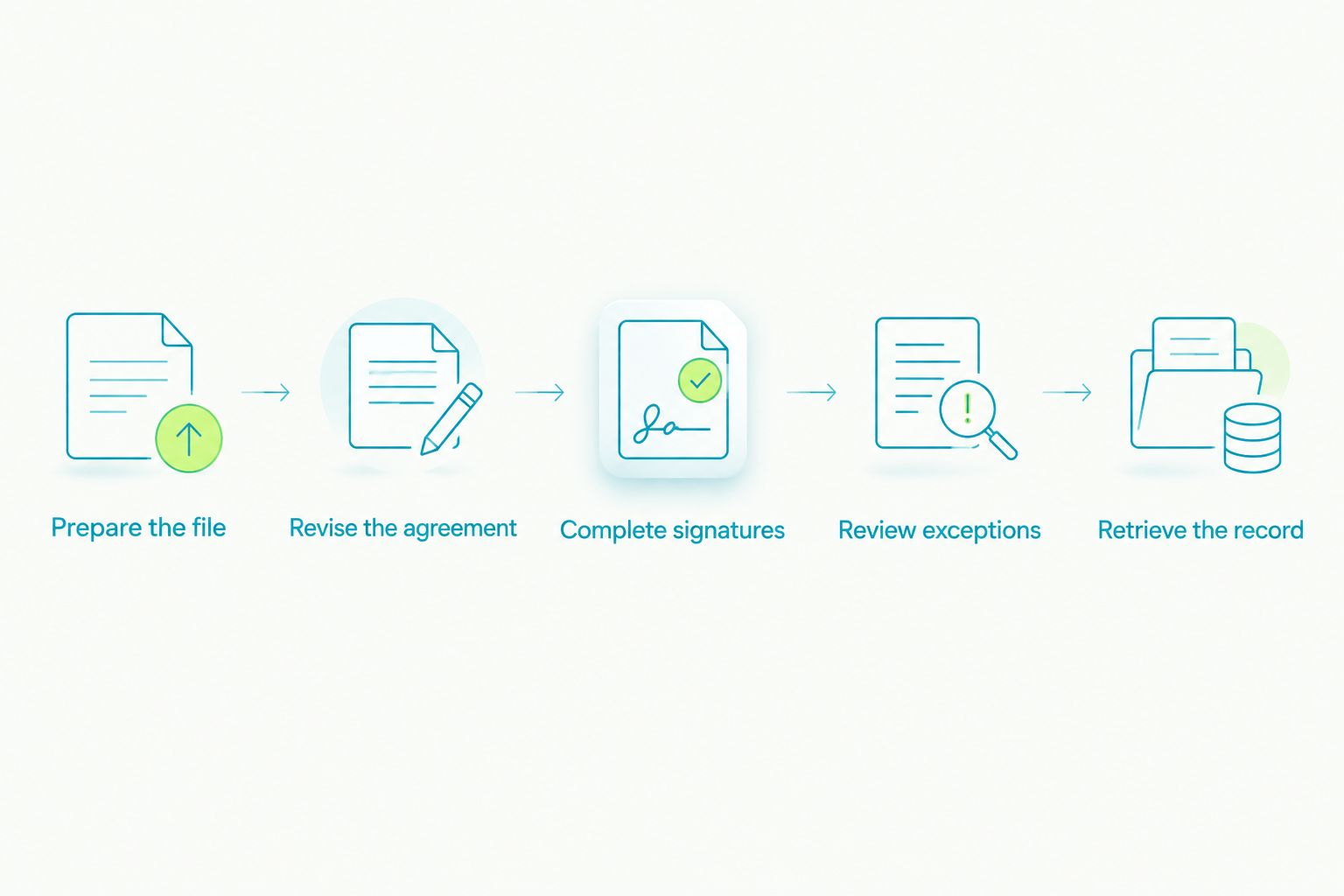
Record the result of each step as demonstrated, unresolved, or outside scope. An unresolved requirement needs an owner and a follow-up action; a verbal assurance is not the same as a demonstrated workflow.
Use the demo to walk through your sample transaction. Keep the agenda tied to these acceptance steps rather than allowing a feature tour to replace the test.
How we ranked
This 2026 ranking prioritizes workflow fit: combined deal functions first, then document collaboration, brokerage review, and signature-centered coordination. The criteria are scope, document control, ownership, review evidence, operational fit, and record retrieval—not an unsupported claim that one platform wins every category.
Treat the ordering as a decision tree. A brokerage with a review bottleneck should start with the review-focused option, even when another platform appears first overall.
Which platform should you choose?
Choose Goclai when contracts, eSignatures, payments, and compliance all belong in your transaction management software evaluation. That is the default recommendation for a team seeking combined deal workflows in 2026.
Choose dotloop when collaborative document work is the primary requirement. Choose SkySlope when brokerage file review leads the decision, or Docusign Rooms when transaction-room and signature coordination define the scope.
Do not select a wider platform simply because it covers more categories. Buy the scope your team can assign, test, and operate, with a named owner for every responsibility that remains outside it.
FAQ
What's the best transaction management software for real estate teams?
Choose according to the workflow you need to control: combined deal functions, document collaboration, brokerage review, or signature coordination. Require the shortlisted platform to complete your sample transaction before making the final decision.
Is transaction management software the same as a real estate CRM?
No. Transaction management centers on executing and documenting a deal, while a CRM centers on relationships and sales activity. Define how information moves between those responsibilities before choosing software.
Is dotloop better than SkySlope for a real estate team?
dotloop is the more direct shortlist choice for collaborative transaction documents; SkySlope is the more direct choice for brokerage file review. Test both against the same transaction checklist if your team needs both functions.
Can electronic signatures replace transaction management software?
Electronic signatures address document execution, not every transaction responsibility. Your team still needs an assigned process for outstanding documents, corrections, review decisions, and final record retrieval.
What should a broker ask during a software demo?
Ask the demonstrator to complete a sample transaction, revise a document, resolve an incomplete submission, and retrieve the final record. Require each handoff to identify an owner and evidence of completion.
Can software guarantee real estate compliance?
No software replaces the brokerage's responsibility to establish applicable requirements and exercise professional judgment. Evaluate compliance workflows as support for submission, review, correction, and recordkeeping.
Should a small real estate team choose an all-in-one platform?
Choose combined workflows when your team needs the included functions and can assign responsibility for them. A narrower platform is the better fit when the operational problem is limited to document collaboration or signing.
One last thing
Test what happens when the original coordinator is unavailable. Ask another authorized team member to identify the current agreement, the unresolved task, and the person responsible for it.
That exercise tests whether the transaction record carries the process—or whether the process still depends on one person's memory. Use the result to define one testable process change before rollout.